Concepts
This page explains the ideas you need to use SignalCore well: how the library is put together, how a spectrum is laid out and read, how windowing and the DC bin shape a measurement, and what the signal generator and streaming processors are for. Each section names the calls involved. The API Reference has the full signatures, and the Recipes put these ideas to work on specific jobs.
The signalcore namespace
Every type and function in the library lives in a namespace called
signalcore. A namespace is a named scope. Because SignalCore uses short,
common words like FFT, Trigger, and Sine, the namespace keeps those
identifiers from colliding with names in your own sketch or in another library.
The usual pattern is to bring the namespace into scope once, right after the include:
With that using line in place you write FFT<1024>,
SignalGenerator, and WindowType::BlackmanHarris directly. Leave it out and
you spell each name with the signalcore:: prefix instead
(signalcore::FFT<...>). That is worth doing only if one of these names happens
to clash with something else in your sketch.
How the library is organized
SignalCore is header-only: there is no separate library file to compile or link against. Including a header copies its code into your sketch when it builds, so installing the library is just a matter of making the headers available to the compiler. There is no build step to set up.
SignalCore.h is an umbrella header that includes every module at once. It is
the simplest way to start, and what the examples use:
| Module | Header | What it's for |
|---|---|---|
| FFT | signalcore/FFT.h |
Frequency analysis: the FFT<> transform plus peak-finding and signal-quality metrics |
| DDS | signalcore/DDS.h |
Generating signals in software: the high-level SignalGenerator and the lower-level DDS oscillator |
| Windows | signalcore/Windows.h |
Window functions that reduce spectral leakage before a transform |
| Trigger | signalcore/Trigger.h |
Edge triggering to hold a repeating waveform still, oscilloscope-style |
| PeakHold | signalcore/PeakHold.h |
Per-bin max-hold for spectrum displays |
| MovingAverage | signalcore/MovingAverage.h |
Exponential smoothing of a spectrum or signal |
| Platform | signalcore/Platform.h |
Board and backend detection, plus math helpers the other modules rely on |
Including SignalCore.h pulls in all of it. If a sketch needs only one or two
modules and program memory (flash) is tight on a small board, include just
those headers instead. For example, #include <signalcore/FFT.h> pulls in only
the FFT module for a spectrum-only sketch, and the compiler leaves the rest out.
The same results on every board
A fair question for any cross-platform library is whether an FFT will give the same answer on a Teensy as on an ESP32. SignalCore is built so that it does.
The FFT has two interchangeable implementations, and the library selects one for you when the sketch compiles:
| Implementation | When it is used |
|---|---|
| CMSIS-DSP (hardware-accelerated) | On Teensy 4.x, automatically. CMSIS-DSP is ARM's optimized signal-processing library; on a Teensy it runs the transform much faster than plain C++ can. |
| Portable C++ | On every other board: a self-contained power-of-two FFT that needs no special hardware or extra libraries (radix-2 Cooley-Tukey implementation). |
The selection is conservative on purpose. Some ARM cores ship the CMSIS headers but do not actually link the compiled DSP code, which would make a build fail at the last step. To avoid that, automatic use is limited to Teensy 4.x, where the toolchain is known to provide the whole library. Other ARM boards (Arduino Giga, STM32, SAMD51) can opt in with a single define before the include:
See Configuration & Platforms for more.
The key point is that both implementations produce the same spectrum, bin for bin. You can develop a spectrum-analysis sketch on a Teensy and deploy it on an ESP32, or the reverse, without changing any of the spectral code.
How data flows
Almost every SignalCore sketch follows one of two paths, and both begin with a
buffer of samples. Those samples can come from real hardware, such as
analogRead() on an ADC pin, or from the built-in SignalGenerator when you
have no signal source on hand.
The first path is frequency analysis. You hand a block of samples to
fft.calculate(), which windows them, runs the transform, and leaves a
magnitude spectrum in its result buffer. From there you read numbers off the
spectrum. peakBin() and peakFrequency() give the strongest frequency,
SINAD() and ENOB() grade the signal's quality, and passing the spectrum
through ExponentialMovingAverage or PeakHoldProcessor steadies it for a
display. When you want the values in decibels, postScaleDB() converts the
buffer in place.
The second path stays in the time domain. Instead of building a spectrum, it
finds a stable starting point in the samples so a repeating waveform stops
scrolling across the display. You capture into a buffer larger than the frame
you intend to draw, and trig.calculateOffset() returns a pointer into that
buffer, positioned so a chosen edge sits at a fixed place in the frame. An edge
here is simply the moment the signal crosses a threshold level. This is the same
idea as the trigger control on an oscilloscope.
A scope-style sketch often runs both paths over a single capture buffer, so the
same data appears at once as a spectrum and as a steady, triggered trace. The
Recipes build each path step by step. For a detailed example of both paths, that streams data to ViewPoint to be visualized see the ViewPoint example Cartesian/SignalAnalyzer_A0.
Window functions
When an FFT runs on a chunk of samples, it treats that chunk as if it repeats forever. If the signal does not complete a whole number of cycles in the chunk, the two ends do not line up, and the transform smears the tone's energy across neighboring bins. That smearing is called spectral leakage, and it can bury a small tone sitting next to a large one.
A window reduces leakage by tapering the samples toward zero at both ends before the transform, so the chunk joins smoothly to its imagined neighbor. The cost is that tapering slightly widens the main peak. Each window strikes that balance between a narrow peak and low leakage differently.
SignalCore ships ten windows as the WindowType enum: Rectangle, Hamming,
Hann, Triangle (also called Bartlett), Nuttall, Blackman,
BlackmanNuttall, BlackmanHarris, FlatTop, and Welch. None is also
accepted and means no taper at all, the same as Rectangle. Set a window once
on the FFT object:
To save RAM, the FFT keeps only the first half of a window's coefficients and
mirrors them across the center, since every window it ships is symmetric. The
Rectangle and None windows apply no taper, so they skip the multiply step
entirely. The Recipes include a table of which window to reach for
and an example that measures the leakage difference between them.
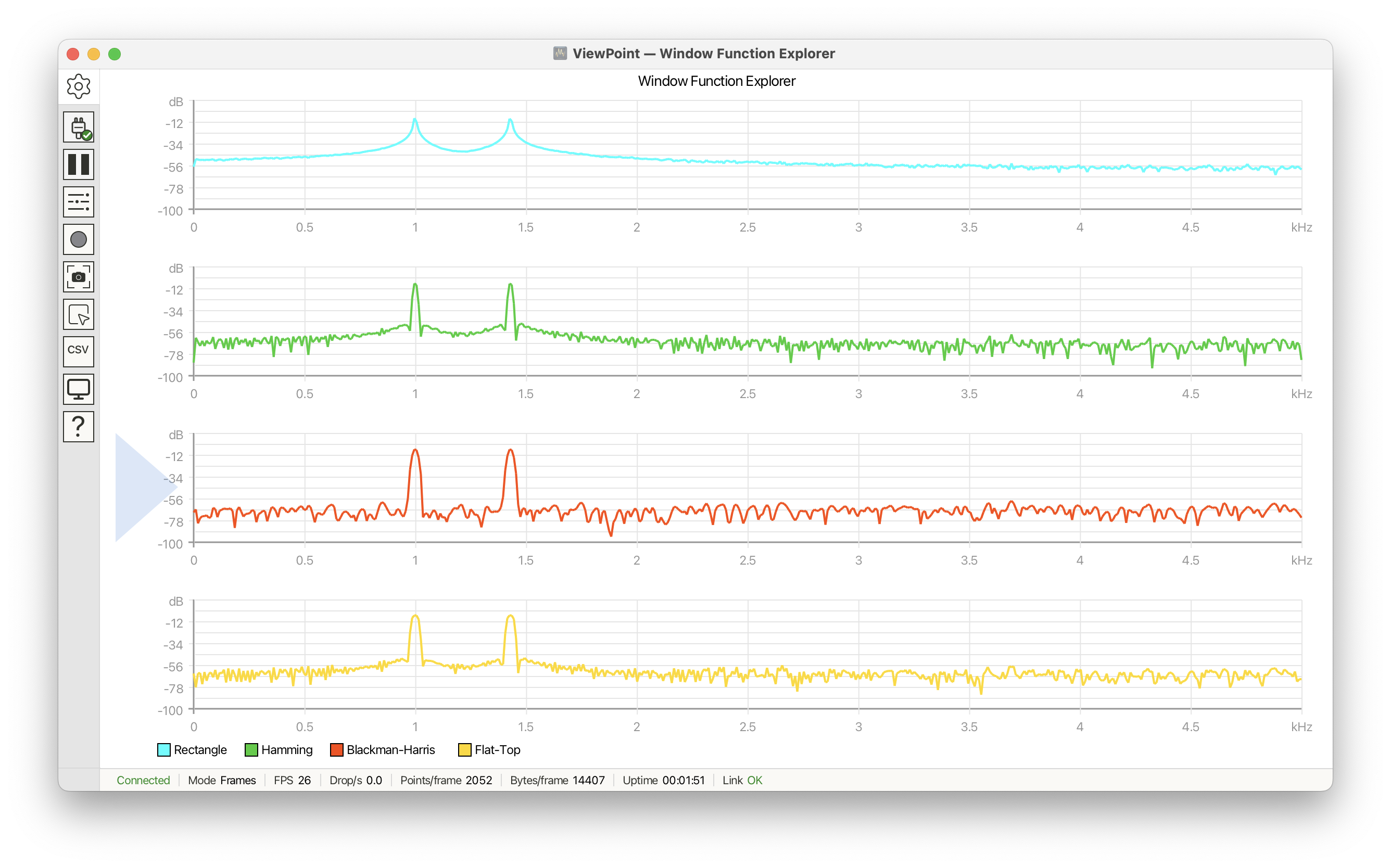
ViewPoint contains an example, Cartesian/WindowFunctionExplorer that helps visualize the effect of different windows on the same data.
FFT output format
A real-input FFT of N samples produces N/2 + 1 useful values, called bins.
Each bin holds the magnitude, the strength, of one frequency. The rest of the
transform's output is a mirror image of these bins and carries no new
information, so SignalCore leaves the useful bins in the result buffer and you
ignore the rest.
| Index | Contents |
|---|---|
result[0] |
DC, the average level of the signal |
result[1 .. N/2 - 1] |
Magnitude of each frequency between DC and Nyquist |
result[N/2] |
Nyquist, the highest frequency the FFT can represent (half the sample rate) |
You read the spectrum straight off the FFT object. It converts to a float*, so
you can treat it like a plain array of magnitudes:
The internal layout before this point, where real and imaginary parts sit interleaved in the same array, is described in the API Reference. You do not need it to read a result.
The DC bin
Bin 0 is the one to watch when you are looking for a tone. Any constant offset in the input, called DC, lands entirely in bin 0. On raw ADC data that offset is often taller than the signal itself, so a naive search for the tallest bin would return bin 0 every time.
Two habits keep DC out of the way. The first is to remove it before the
transform with removeDC(), which flattens bin 0 to almost nothing. The second
is to start the peak search at bin 1 instead of bin 0. findPeak takes a start
index for exactly this, and it returns an absolute bin number, so there is
nothing to adjust afterward:
For the common case the FFT does this bookkeeping for you. fft.peakBin()
returns the dominant bin with DC already skipped, and
fft.peakFrequency(sampleRate) gives that frequency in Hz.
removeDC() is the real fix. Starting at bin 1 is the backstop for the integer
path, where calculate(uint16_t*) reads ADC counts directly and cannot subtract
the bias for you. Once you have read the linear magnitudes, convert them to
decibels in place with postScaleDB(). If log10f is too heavy
on a slower board, postScaleDBFast() trades a little accuracy for speed.
Signal generation
Sometimes you need a signal and have no hardware to read, or you want a known, clean input to test your processing against. SignalCore can synthesize one in software, at two levels of control.
SignalGenerator is the high-level path and the one most sketches use. You set
a carrier shape and frequency, optionally add amplitude modulation and gaussian
noise, then pull samples one at a time with nextSample(). It is well suited to
feeding synthetic data into an FFT while you develop a spectrum sketch.
SignalGenerator sig(SAMPLE_RATE);
sig.setCarrier(SignalShape::Sine, 1000.0);   // 1 kHz sine
float s = (float)sig.nextSample(0);          // 0 means full-resolution float
DDS together with DDSSineTable<> is the low-level path. It is a
phase-accumulator oscillator: a 32-bit counter advances by a fixed step each
sample and indexes a pre-built wave table, which is an efficient way to produce
a steady tone. DDSSineTable<> fills that table when it is constructed and
keeps it in RAM — 4 bytes per sample (Samples1024 = 4 KB), so size the table
to your board. Reach for this when you want tight, table-driven tone generation
and do not need modulation or noise.
SignalShape selects the waveform for both the carrier and the modulation
source. The choices are Sine, Square, Triangle, Sawtooth, Noise, and
None.
Streaming processors
Three classes work on a running stream of data across many calls, rather than on
a single one-shot buffer. PeakHoldProcessor and ExponentialMovingAverage
keep their results in an internal array that you read back the same way as an
FFT result, either by indexing it or by reading it as a float*. Trigger
owns no result array: calculateOffset() returns a pointer into the capture
buffer you pass it, and valid() says whether that pointer is edge-aligned.
Trigger finds a rising or falling edge in a sample buffer and reports an
offset so that edge sits at a fixed position in the frame you draw. It uses
hysteresis, a small margin around the threshold, so that noise wobbling across
the threshold does not fire a burst of false triggers. This is the standard way
to hold an oscilloscope-style trace still.
PeakHoldProcessor keeps a running maximum for each element and lets each held
peak fade slowly back toward the live value. A decay factor controls the fade,
and a value closer to 1.0 holds the peaks longer. It is common for the max-hold
bars on a spectrum analyzer and for envelope following.
ExponentialMovingAverage smooths each element over time. It is a single-pole
filter, meaning each output is a blend of the newest sample and the previous
output, weighted by sampleWeight (the smoothing factor DSP texts often call
alpha). A smaller sampleWeight smooths harder and responds more slowly. Note
that sampleWeight and decay are opposite conventions, so do not copy one
value into the other.
PeakHoldProcessor and ExponentialMovingAverage allocate their internal
arrays when constructed. On a RAM-tight board such as an AVR, create them once
at the size you need early in setup(), rather than resizing them repeatedly in
the loop. That keeps the heap from fragmenting.
Created by VoidLoop · Founded by Gregory Kovacs · Written by Zachariah Magee